

Introduction: The AutoCAD Assumption Is Costing You Money
For decades, AutoCAD has been treated as the default choice for 2D CAD. But in 2026, that assumption deserves a hard look. DraftSight 2026 has evolved from an “AutoCAD alternative” into a serious, feature-rich drafting platform that matches or exceeds AutoCAD in the areas that matter most to working engineers — while costing a fraction of the price.
At P CAD CAM PVT LTD , we’ve migrated dozens of Indian engineering teams from AutoCAD to DraftSight. The result? Same output. Faster workflows. Dramatically lower licensing costs. Here’s why DraftSight deserves to be your first choice in 2026 — and where AutoCAD still fits (but only for specific niches).
1. DraftSight 2026: Built for Real-World Productivity
DraftSight 2026 isn’t playing catch-up anymore. It’s setting its own pace with tools that solve real drafting problems:
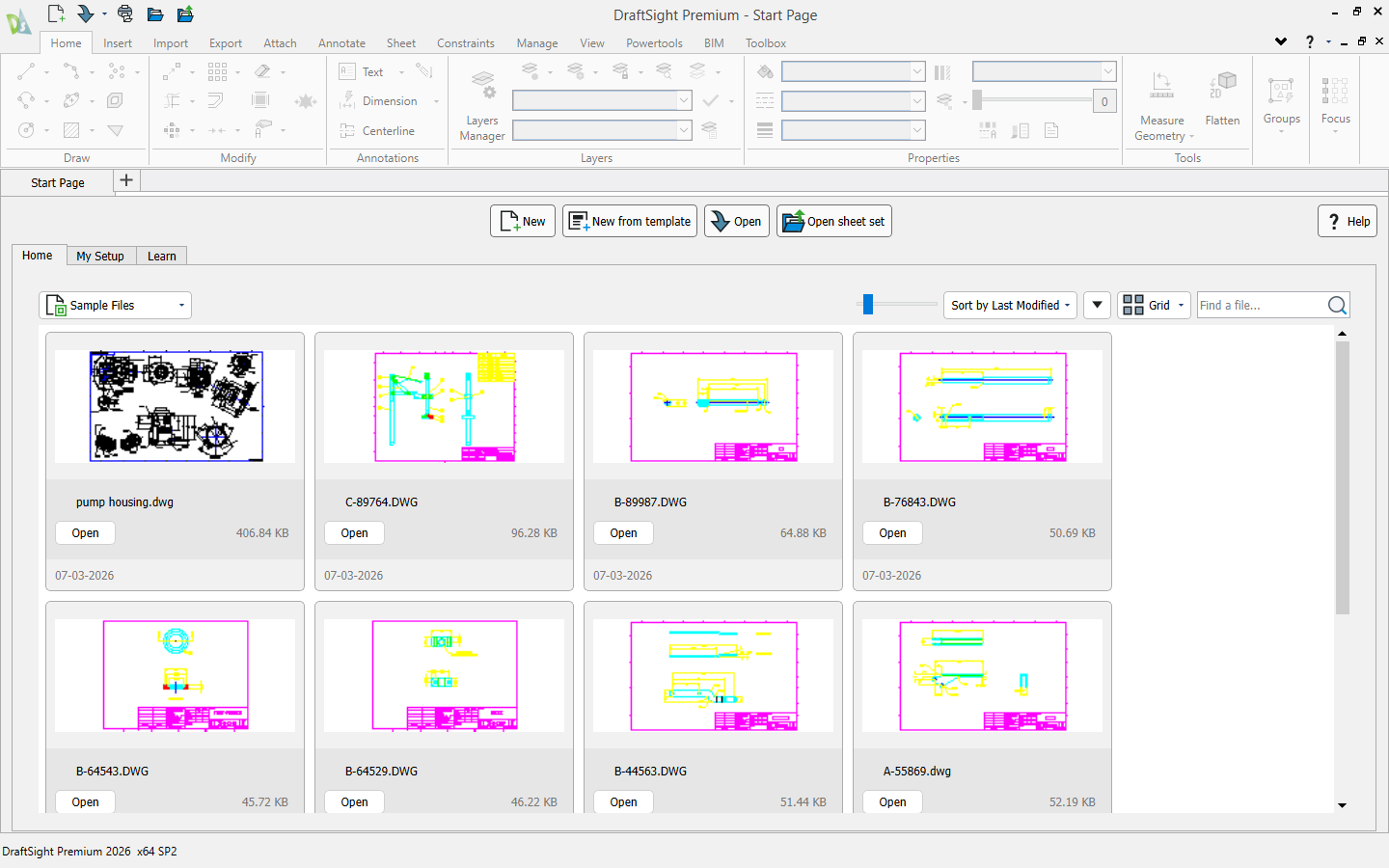
Start Page: Zero-Friction Project Launch
The new Start Page (Premium, Enterprise Plus, Mechanical) puts everything at your fingertips — recent drawings, favorites, templates, learning resources, and product updates — in one clean dashboard. No digging through folders. No hunting for the right template. You open DraftSight and you’re working in seconds.
Floating Windows: Multi-Monitor Done Right
Drag drawing tabs to a second monitor and work across files side-by-side. Compare as-built vs. design drawings. Copy entities between sheets without Alt-Tab chaos. This is how modern drafters actually work — and DraftSight 2026 finally delivers it natively.
Gradient Hatch & Pattern Ribbon
Presentation-quality drawings matter. The new Gradient Hatch fills add visual depth for material representation and zone highlighting. The Pattern Ribbon consolidates all array and pattern tools into a single, logical tab — faster access, less menu hunting.
AutoCAD’s counter? Faster file opens (up to 11×) and startup speed (4×). Impressive, no doubt — but these are quality-of-life improvements, not workflow transformers. Once the file is open, DraftSight’s feature set keeps pace or pulls ahead for pure 2D work.
2. Automation That Actually Works for Drafters
AutoCAD 2026 markets Smart Blocks as its AI headline — auto-detecting objects, suggesting block replacements, and learning placement patterns. Sounds futuristic. In practice? It needs training data from your drawings to be useful, and new projects start from zero.
DraftSight 2026 takes a more practical, immediately usable approach:
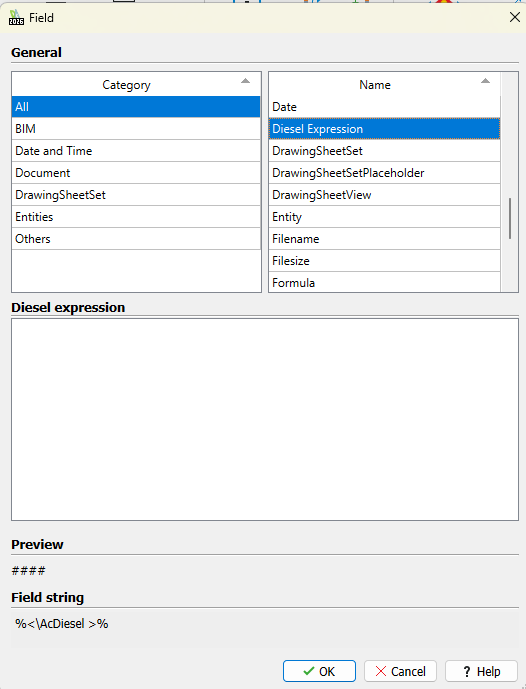
- DIESEL Expressions (Professional+): Dynamic text generation, menu customization, and status-bar automation using a string-based macro language. Power users can build responsive, personalized CAD environments without complex APIs.
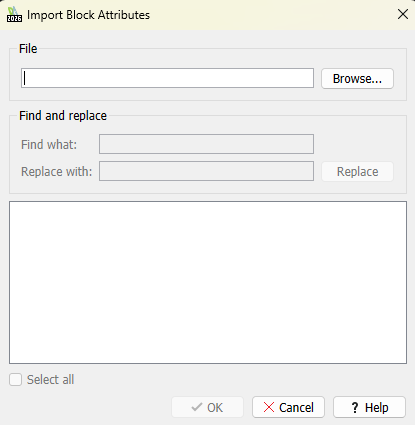
- IMPORTBLOCKATTRIBUTES (Premium+): Update block attributes directly from Excel or CSV files. No manual edits. No copy-paste errors. Link your BOM spreadsheet to your drawing and watch attributes populate automatically.
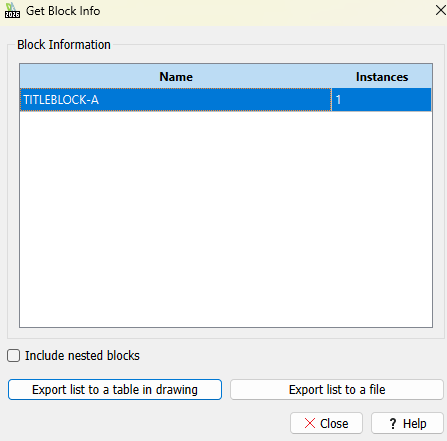
- GETBLOCKINFO (Premium+): Auto-count block instances across a drawing or selected area, then output results to a table or export file. Drawing audits and quantity takeoffs that used to take an hour now take a click.
The difference? AutoCAD’s AI is flashy but situational. DraftSight’s automation is spreadsheet-friendly, scriptable, and deployable today — no training period required.
3. Manufacturing-Focused Power: DraftSight Mechanical
This is where DraftSight truly separates itself. DraftSight Mechanical is purpose-built for 2D mechanical design — and AutoCAD has no direct equivalent at this price point.
- Automated Part Nesting: The Nesting Manager task pane automatically generates optimized sheet layouts. Less material waste. No manual nesting calculations. For sheet-metal and fabrication shops, this alone can justify the license.
- Power Dimensions (AM_DIMSTRETCH): Stretch geometry by editing dimension values. Design intent drives the geometry, not the other way around. 100% accuracy between what you specify and what gets manufactured.
- Global Dimension Edit (AM_DIMMEDIT): Edit multiple dimensions in one operation. What used to be 50 individual clicks becomes one command.
- Dimension Merge (AM_DIMJOIN): Merge dimension chains into unified annotations. Cleaner drawings. Faster editing.
- Mechanical Symbol Library: Insert GD&T and machining symbols directly into notes. Standards-compliant. No more drawing symbols from scratch.
- High-Fidelity STEP Export (Premium/Mechanical): Export 2D drawings directly to STEP format for downstream CAM and CAE workflows.
AutoCAD includes a Mechanical toolset, yes — but it’s a subset of a broader bundle, not a dedicated mechanical workflow. DraftSight Mechanical is engineered for this specific job, and it shows in the tool design.
4. Collaboration Without the Ecosystem Tax
AutoCAD’s collaboration story is powerful — but only if you pay for the full Autodesk stack. Connected Support Files, Markup Assist, and Activity Insights all assume your team is locked into Autodesk Docs. That’s a significant subscription commitment on top of an already expensive seat license.
DraftSight 2026 offers a more flexible path:
- PLM Drawing Attributes (Premium/Mechanical): View and manage PLM metadata directly in Drawing Properties. If you’re on the 3DEXPERIENCE platform, this is seamless. If not, DraftSight still plays nice with standard DWG workflows and external PDM systems.
- PCX Plotter Configuration Files: Save and share custom plotting setups across teams and workstations. No per-user configuration. No IT headaches.
- Custom Color Books (Premium+): Full Pantone access plus custom color library uploads. Brand consistency across drawings, without extra plugins.
Bottom line: AutoCAD collaboration is excellent — if you can afford the ecosystem. DraftSight gives you professional collaboration tools without forcing you into a single vendor’s cloud.
5. The Pricing Reality: This Is Not Close
Let’s talk numbers, because this is where DraftSight changes the conversation entirely.
- AutoCAD 2026: Available in Subscription only on annual contracts. For a 10-user team it will be in crore annually — before you add industry toolsets or cloud storage.
- DraftSight 2026: Availble at 61% less cost of Auctocad. Also Professional and Premium scale up with features, but even the top tiers are priced aggressively against AutoCAD LT and full AutoCAD. Enterprise and Mechanical tiers are built for teams, not individual luxury purchases.
For a 10-user drafting team, switching to DraftSight can save enough to fund Engineer’s salary. For a solo freelancer or SMB, DraftSight Professional covers 95% of real-world needs at under 5% of AutoCAD’s cost.
The honest question: What exactly are you paying AutoCAD’s premium for? If the answer is “we’ve always used it,” that’s not a feature.
6. Who Should Choose DraftSight 2026?
DraftSight is the right choice if you:
- Primarily do 2D drafting or light 3D modeling
- Need DWG compatibility without vendor lock-in
- Work in mechanical design, sheet-metal, or manufacturing
- Want nesting, power dimensions, and GD&T tools built-in
- Need flexible, lower-cost licensing for teams of any size
- Prefer spreadsheet-driven automation over AI black boxes
Final Word: DraftSight Is the Rational Default in 2026
AutoCAD earned its reputation over four decades. But reputation is not ROI.
In 2026, DraftSight delivers the features that working drafters actually use — DWG compatibility, mechanical tooling, spreadsheet automation, multi-monitor workflows, and professional plot management — at a price point that respects your budget. AutoCAD’s advantages are real, but they’re increasingly niche: specialized toolsets, deep cloud integration, and legacy API ecosystems.
For the vast majority of Indian engineering teams — fabricators, machine builders, product designers, and general drafting shops — DraftSight Professional or Premium is not a compromise. It’s an upgrade in value.
Ready to evaluate DraftSight for your team? Contact CustomizeCAD for a hands-on demo, migration support, and flexible licensing options tailored to Indian engineering firms.