

The Documentation Bottleneck
Every engineering team knows the pain. The CAD model is finished, the design review is done, and then someone in technical publications has to produce the service manual, the assembly instructions, the training material, and the sales brochure.
The usual approach? Export screenshots from CAD, paste them into a Word document or InDesign, draw red arrows and callout boxes by hand, and pray the design doesn’t change. When it does — and it always does — someone starts over from scratch.
SOLIDWORKS Composer exists to break that cycle. It is not a CAD tool. It is a technical communication tool purpose-built to turn 3D CAD data into the documentation your customers, service teams, and factory floor actually use.
What SOLIDWORKS Composer Actually Does
At its core, Composer takes your existing CAD assemblies and lets you create: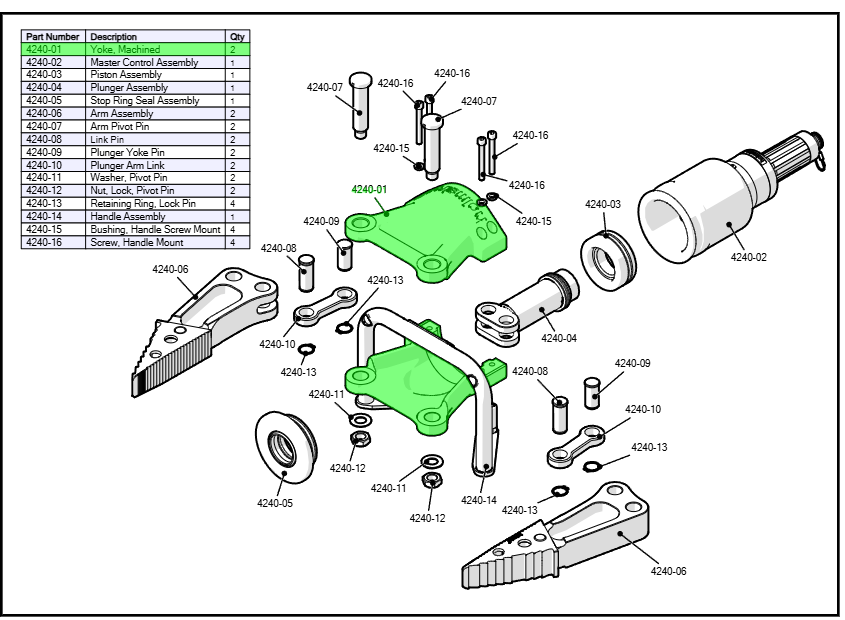
- Exploded views — Show exactly how parts come apart and go together, with callouts and BOM balloons that update automatically when the model changes.
- Step-by-step procedural animations — Walk through assembly, disassembly, installation, or service sequences. Each step can have its own view, labels, and timing.
- Interactive 3D content — Export to 3D PDF or HTML5 so end users can rotate, zoom, and step through the procedure on any device.
- Technical illustrations — 2D vector output in line art, shaded, or technical-illustration style — the kind of clean, published-looking drawings that belong in a printed manual.
- BOM and callout balloons — Linked directly to the model geometry. When the CAD changes, the BOM updates too.
Because Composer uses a lightweight file format (.smg) that stays linked to the source CAD, you don’t start over when the design revs up. You import the updated geometry, and your views, animations, and annotations carry forward.
The Composer Family: Three Products, One Workflow
SOLIDWORKS Composer is the authoring tool, but it’s part of a wider family.
SOLIDWORKS Composer (The Author)
This is where the documentation gets built. One seat per technical writer, training specialist, or publications engineer. This is the only product in the family that can author illustrations, animations, and interactive content from scratch.
SOLIDWORKS Composer Sync (The Automator)
A headless batch-rebuild engine. When your customer has hundreds of SKUs and the CAD changes every release cycle, Sync automatically re-imports the updated geometry and regenerates all outputs — overnight, as a scheduled job, or triggered by a PDM workflow. Sync does not replace Composer. It complements it. You need Composer to author the files first.
Best for OEMs, capital equipment manufacturers, and any company whose documentation volume makes manual updates painful.
SOLIDWORKS Composer Player Pro (The Consumer’s Upgrade)
The free Composer Player lets anyone open an .smg file and play animations. Player Pro adds measurement tools, 2D output (print/export), markups, cross-sections, and BOM inspection. Buy this for the downstream team — service technicians who need to check clearances, training managers producing handouts, or sales engineers doing interactive walkthroughs.
Quick Decision Rules
- Creates the documentation → Composer
- Consumes it and needs to measure/print → Player Pro
- Consumes it and only needs to view → Free Composer Player (no cost)
- CAD changes often and illustrations must follow → Composer + Composer Sync
Real-World Use Cases
1. Capital Equipment & Industrial Machinery
Your customer ships a machine with a 200-page installation manual. Today they build it from CAD screenshots and InDesign. When a bolt pattern changes in revision B, someone has to hunt down 40 screenshots and re-take them. With Composer, you update the model once and all linked views regenerate. Installation manuals, spare-parts catalogs, and service procedures stay in sync automatically.
2. Automotive Aftermarket & Tier 1/2 Suppliers
Assembly instructions for sub-systems — wiring harnesses, brake assemblies, HVAC modules — need to be clear enough that a technician on the line can follow them in under 30 seconds. Composer’s step-by-step animation mode is purpose-built for this. Output to HTML5 and the instructions run on a tablet or phone on the shop floor.
3. Consumer Products
Furniture, fitness equipment, electronics — anything with a “some assembly required” label. An interactive 3D PDF or animated GIF embedded in a QR code on the box reduces support calls and returns. Composer can output to SVG, MP4, or interactive HTML in minutes.
4. Training & Sales
Sales engineers can send a 3D PDF or link to interactive HTML that lets a prospect explore the product themselves — explode it, rotate it, hide components. No CAD license needed on the recipient’s side. Training teams build competency models: “Step 1: Remove cover. Step 2: Locate the filter. Step 3: Rotate 90° counterclockwise.”
Who Should NOT Buy SOLIDWORKS Composer
- Teams that only need photorealistic renderings — That’s SOLIDWORKS Visualize. Composer is for technical/schematic illustration, not marketing renders.
- Single-product shops with stable designs — If you produce one manual a year and the design barely changes, the ROI on automation is thin. Stick with your current workflow.
- Companies without a dedicated publications person — Composer has a learning curve. It pays off when someone owns the documentation process. An engineer doing it “in their spare time” is better off with SOLIDWORKS drawings and native 2D exports.
Bottom Line
SOLIDWORKS Composer is the answer to the question: “Why are we still building service manuals from hand-drawn screenshots?”
If your customer produces assembly instructions, service manuals, training material, installation guides, or spare-parts catalogs — and their CAD models change more than once a year — Composer is a tool that pays for itself in the first major revision cycle.
Need help sizing the right Composer setup for your team? Contact us at CustomizeCAD and we’ll walk through your documentation workflow — no obligation.